The easy way to build Serverless applications
December 4, 2025 10 minutes


For teams seeking a more efficient way to deploy, test, and scale applications without managing underlying infrastructure, the Serverless Framework provides a practical solution. The framework streamlines the development and deployment of cloud applications by allowing you to define the entire application architecture such as APIs, databases, functions, and containers in a single configuration file. Applications can be deployed with one command, which enables scalable and event-driven workloads across AWS and other cloud providers without the need to manage servers directly.
This article discusses the Serverless Framework and Serverless Containers, including when each approach is appropriate, how cloud environments can be replicated locally, and why these frameworks are increasingly used for building scalable and efficient cloud-native applications.
Serverless team also provides the Serverless Containers Framework, which is intended for teams that deploy container-based workloads on services like AWS Lambda and AWS Fargate. Together, these tools allow development teams to use the most suitable compute model for each workload, whether function-based or containerized, while maintaining a consistent development experience.
A major advantage of Serverless is the ability to replicate cloud environments locally. This improves developer productivity and helps reduce cloud service costs during the development process. Beyond this capability, the Serverless Framework offers several features that support an efficient and predictable workflow:
A typical Serverless project that targets AWS includes the following components.
Below is a simple example of a Serverless Framework YAML configuration file for an API:
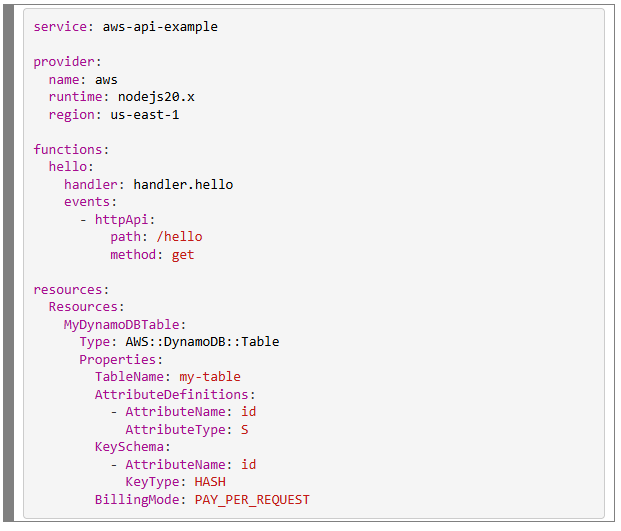
In many cases, resources do not need to be defined explicitly for the Serverless Framework to create them. For example, if a function is triggered by an SQS queue, the framework can provision that queue automatically based on the configuration. This reduces repetitive setup work while still allowing developers to customize or explicitly define resources when required.
The Serverless Framework enables teams to define key infrastructure components directly within the project configuration. Common AWS resources that can be provisioned through the framework include:
With the release of Serverless Framework V4, official support for non-AWS cloud providers has been deprecated. This includes earlier integrations with providers such as Azure and Google Cloud.
This change may affect teams with existing multi-cloud architectures, but it also signals a shift in how the framework intends to support alternative cloud environments in the future. Instead of maintaining legacy implementations, the Serverless team is focusing on establishing a foundation for a more modern, reliable, and scalable approach to multi-cloud support. This new approach is expected to be introduced in upcoming releases.

The Serverless Framework enhances its Infrastructure as Code capabilities through the following features:
Although the Serverless Framework is primarily designed for function-based workloads, many modern applications require container-based execution. Examples include long-running APIs, background processing, or services that maintain internal state.
To support these scenarios, the Serverless team has introduced the Serverless Containers Framework (SCF). This framework provides a unified way to deploy containers on serverless platforms such as AWS Lambda Containers and AWS ECS Fargate. It offers the same declarative, configuration-driven workflow as the Serverless Framework, but is tailored to containerized workloads.
Below is a summary of the key capabilities of SCF:
.env files, AWS Systems Manager Parameter Store, AWS Secrets Manager, and Terraform state files.The Serverless Containers Framework uses a straightforward YAML configuration model to define container-based architectures. This configuration is stored in the serverless.containers.yml file. Even complex application setups can be described in a concise and structured way.
Below is a simple example of how a full-stack application can be defined using this configuration approach:
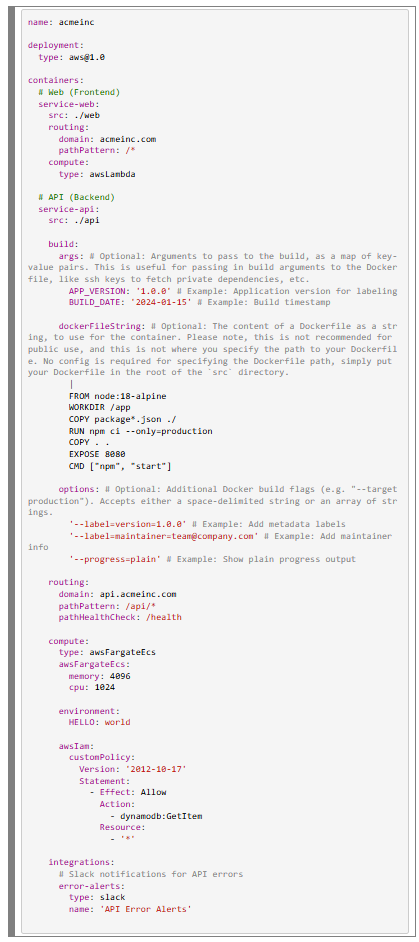
In the Serverless Containers Framework (SCF), there are three primary options for providing a Docker image for an API.
serverless.containers.yml by using the dockerFileString property. This can be useful for simple cases, but it is not recommended for production environments due to limited maintainability.src property in the YAML configuration. SCF automatically detects the file and uses it during image creation.package.json and Python projects through requirements.txt. This allows the application to run without manually creating a Dockerfile. Automatic image generation is currently limited to these runtimes, but SCF can support any language when a valid Dockerfile is supplied.This flexibility allows development teams to choose between a fully customized container setup or SCF’s built-in runtime images for a faster development workflow.
Depending on the workload, you will choose between the Serverless Framework, which is focused on function-based execution and simplifies deployment, and the Serverless Containers Framework, which provides greater flexibility by allowing workloads to run in containers.
| Scenario | Use Serverless Framework | Use Serverless Containers Framework |
|---|---|---|
| Short, event-driven functions | X | |
| Long-running processes | X | |
| High-memory or CPU tasks | X | |
| Mix of both | X | X |
| Gradual migration from traditional containers | X | |
| Lightweight APIs or event handlers | X |
The Serverless Dashboard provides a centralized environment for building, managing, and monitoring serverless applications. It is designed to help teams maintain clarity, governance, and consistency across their serverless workloads.
The web-based interface presents cloud data in a structured and accessible way. It offers developers, operators, and product teams a shared space to track deployments, observe application behavior, review security settings, and collaborate effectively.
The dashboard includes real-time monitoring capabilities that allow teams to track metrics such as function invocations, execution duration, and error rates. These insights are available without requiring manual configuration of CloudWatch queries.
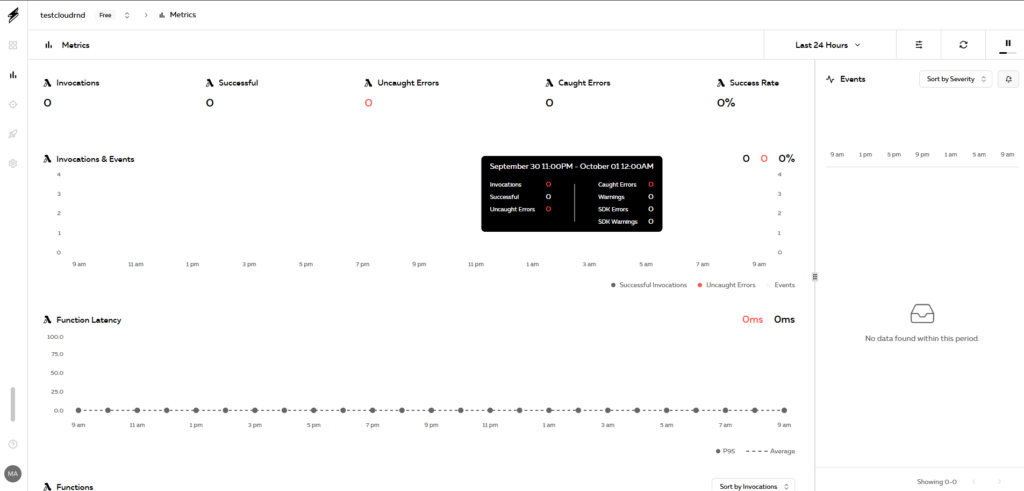
The Serverless dashboard supports integration with platforms such as GitHub, GitLab, and Bitbucket. These integrations enable automated deployments as part of a continuous integration and continuous delivery (CI/CD) workflow.
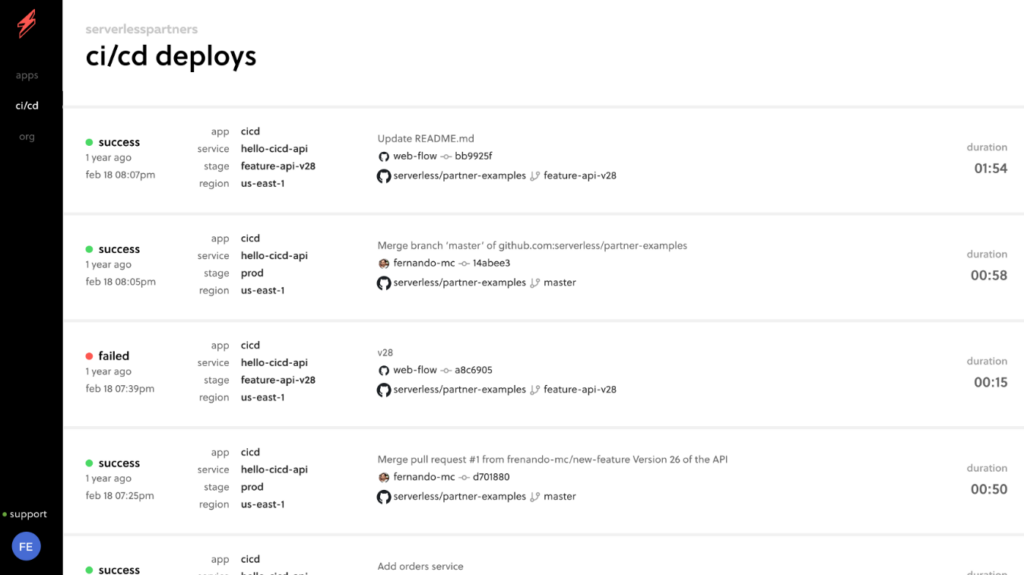
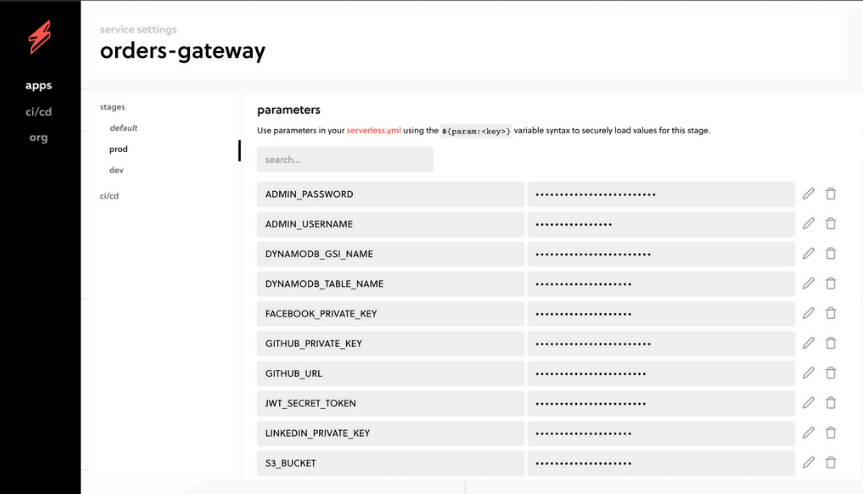
Secrets management features allow teams to control access to sensitive values, review deployment history, and coordinate configuration changes in a shared environment.
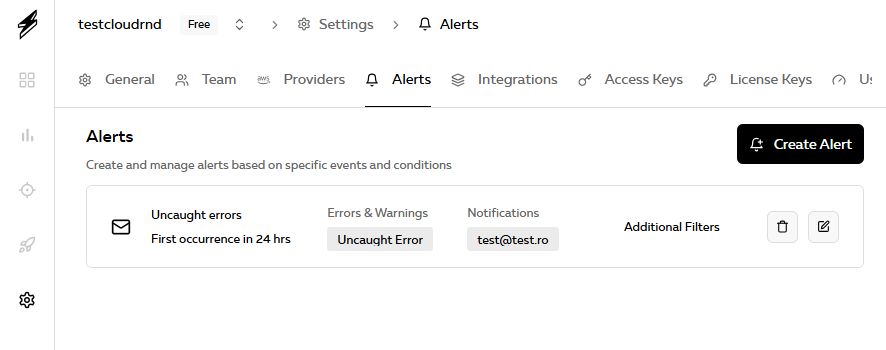
Alerts and notifications help teams stay informed about errors, performance concerns, and unexpected usage patterns. This supports faster investigation and response during operation.
The dashboard integrates closely with the Serverless CLI, allowing developers to manage deployments from the terminal while still accessing detailed monitoring and configuration information through the web interface.
serverless.yml file that is deployed within a specific stage and region for more than ten days in a month. Each service instance consumes 1 credit.Local development tools play an important role in building serverless applications efficiently. The Serverless Framework provides several plugins that emulate cloud services on a local machine, which reduces dependency on cloud deployments during development. The Serverless Containers Framework includes its own built-in local emulation for container-based workloads.
serverless-offline simulates AWS Lambda and API Gateway locally. It allows developers to invoke functions through HTTP requests and supports rapid testing, hot reloading, and multiple runtimes such as Node.js, Python, Java, and Go.serverless-dynamodb provides a local DynamoDB instance for development and testing without connecting to AWS. It supports Java-based and Docker-based setups and integrates with serverless-offline to create a more complete local environment.serverless-s3-local emulates S3 buckets locally, enabling teams to test file uploads, downloads, and bucket configurations. It includes support for CORS, HTTPS, and configurable server options.serverless-offline-sqs allows developers to simulate AWS SQS queues using ElasticMQ. This enables event-driven testing of Lambda functions triggered by queue messages without requiring access to AWS.serverless-offline-sns provides local emulation of AWS SNS topics. It allows publishing messages and triggering Lambda functions locally, with support for automatic topic creation and customizable endpoints.serverless-localstack integrates the Serverless Framework with LocalStack, a comprehensive local emulator for AWS services. It supports local versions of services such as Lambda, S3, and DynamoDB, enabling a testing environment that closely resembles production. LocalStack also offers optimizations such as mounting local Lambda code for faster development iterations.The Serverless ecosystem provides a structured and efficient approach to building, testing, and deploying modern cloud applications. By supporting infrastructure as code and offering tools for local emulation, it helps teams reduce development time, lower operational costs, and implement scalable architectures without the need to manage servers directly.
Both the Serverless Framework and the Serverless Containers Framework are useful options depending on the workload. Together, they offer a flexible foundation for teams that want to adopt serverless principles, build new applications, or modernize existing ones.