Accessibility as a business strategy: Designing for inclusive use
December 19, 2025 9 minutes

As digital interaction becomes central to daily life, organisations increasingly carry the responsibility to ensure that online environments are usable by everyone, including people with disabilities. Accessibility is no longer optional. It is an essential component of modern product development. By applying inclusive design principles, organisations enable users with varying sensory, motor, visual, and cognitive abilities to interact with technology in an effective way. This approach supports equal access, reduces barriers, and improves the overall user experience.
This article explains what digital accessibility involves, why it is relevant from a business perspective, how established guidelines such as the Web Content Accessibility Guidelines (WCAG) provide structure, and which steps companies can take to create products and services that are genuinely inclusive.
Accessibility (often abbreviated as A11y, referring to the letter “a”, followed by eleven characters, and ending with “y”) in web development focuses on designing and building applications that can be used by as many people as possible. This includes users who experience visual, auditory, cognitive, or motor limitations. An accessible interface remains functional under a wide range of user conditions and therefore supports consistent, reliable interaction.
The European Accessibility Act (EAA), which takes effect on 28 June 2025, requires most organisations that provide digital products or services to comply with WCAG 2.2 AA standards. These requirements build on the Web Accessibility Directive (Directive (EU) 2016/2102), which aims to improve the accessibility of public sector websites and mobile applications, especially for users with disabilities.
Legislation provides an important framework, but it does not fully explain why accessibility has become increasingly relevant. The broader context shows significant global need. According to the World Health Organization (WHO):
These figures illustrate that accessibility is not a niche concern but a structural requirement for creating usable and inclusive digital products.
Accessibility is often viewed primarily as a technical requirement, but it provides organisations with a range of practical and strategic benefits.
Key reasons to prioritise accessibility include:
The WCAG 2.2 guidelines are organised around four key principles: perceivable, operable, understandable and robust. Each principle contains success criteria that are grouped into three levels of conformance: Level A (minimum), Level AA (recommended), and Level AAA (highest). Each level builds on the requirements of the levels below it.
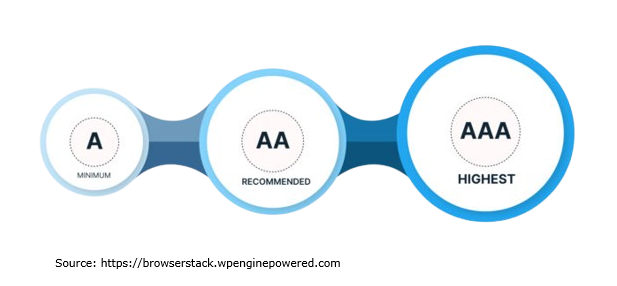
WCAG Level A represents the basic level of accessibility that all websites should meet. Not meeting this level usually indicates major accessibility barriers that may prevent people with disabilities, as well as other users, from interacting with the content.
This level includes approximately 30 success criteria. It is designed to be achievable for any organisation and establishes the essential foundation for an accessible user experience.
WCAG Level AA is generally recommended as the target standard for most organisations. It provides a level of accessibility that is suitable for a wide range of users. To achieve Level AA, content must meet all Level A criteria as well as all Level AA criteria.
This level introduces around 20 additional criteria that build on the basics. Reaching Level AA typically requires more effort, but it significantly improves the accessibility and usability of digital products for most users.
WCAG Level AAA represents the most comprehensive level of accessibility. To meet this level, content must satisfy all criteria across Levels A, AA and AAA. This tier adds approximately 28 new success criteria on top of the previous levels.
Although achieving Level AAA can be challenging and is not always realistic for all types of content, it delivers the highest level of accessibility and offers the broadest benefits to users.
More information about WCAG conformance levels can be found in the official documentation here.
WCAG provides standards for making digital products accessible, but inclusive design offers the methodology behind creating products and services that can be used by people with a wide range of abilities. In short, WCAG defines what must be achieved, while inclusive design explains why accessibility matters and how to design for it in practice.
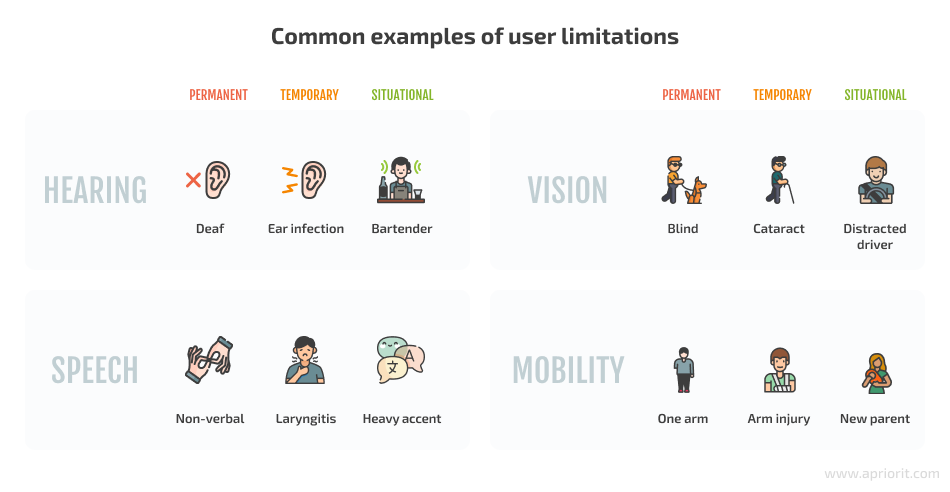
Inclusive design considers the many characteristics that influence how people interact with software. These characteristics include age, culture, geographic location, socioeconomic background, education level, language, and temporary or situational limitations. The aim is to create digital experiences that are usable, flexible and welcoming for the broadest possible audience.
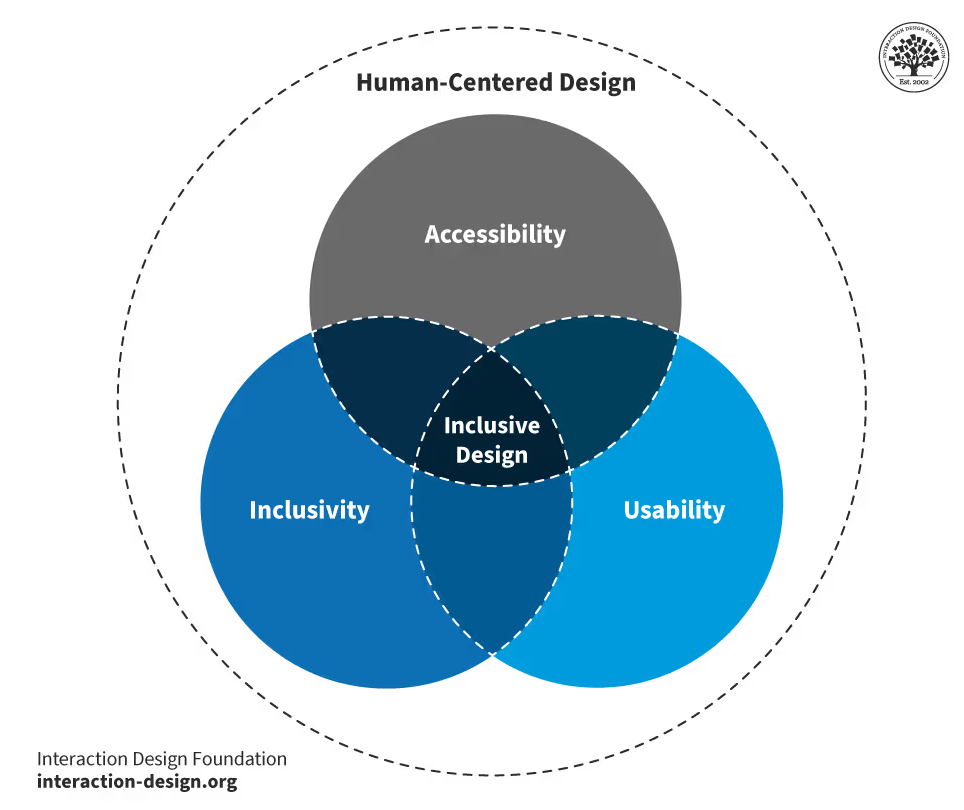
The core pillars of inclusive design are:
The examples below illustrate how inclusive design can improve access for users with different needs. Each pair contrasts non-inclusive approaches with more inclusive alternatives.
Organisations that provide digital products or services can use the following steps to move toward stronger accessibility compliance.*
A full professional audit is recommended, but organisations can begin by identifying obvious issues using quick evaluation tools such as WAVE (Web Accessibility Evaluation Tool), Lighthouse or Accessibility Insights. These tools typically detect 20 to 40 percent of accessibility issues and are effective for identifying common problems such as:
After the initial assessment, the organisation should determine which accessibility laws and standards apply, based on the regions in which it operates (for example, EU markets under the EAA, or US markets under ADA and Section 508). Clarifying the applicable standards enables a structured compliance approach.
The next step is a comprehensive accessibility audit, typically performed against the full WCAG 2.2 AA criteria. The audit identifies all unmet requirements and results in a roadmap that outlines:
Some accessibility improvements may require significant time to implement. In these cases, organisations should publish an accessibility statement that includes:
Accessibility should also be embedded into ongoing development activities, for example by:
Selecting frameworks or libraries that include accessible components can reduce the development effort required to meet accessibility standards. Examples include:
AI-powered tools can further support accessibility by generating captions, alternative text, readability improvements and automated WCAG issue detection.
To maintain accessibility over time and avoid regressions, organisations should incorporate regular testing. This includes:
*Micro-enterprises with fewer than ten employees and annual revenue below €2 million are exempt from the EAA.

The path toward accessibility begins with awareness and continues through ongoing effort. This includes initial assessments, detailed audits, the creation of roadmaps, the selection of accessible frameworks, improvements to development workflows and regular testing with real users. Accessibility is a continuous responsibility rather than a single project milestone.
WCAG standards define what accessible content and interfaces must achieve, while inclusive design principles explain why accessibility is important and how to design with diverse user needs in mind. Together, they enable organisations to create products and services that are not only compliant but genuinely usable for a wide range of people.
Investing in accessibility results in products that are clearer, more efficient and easier to use for all users, not only for those with disabilities.