

As digital interaction becomes central to daily life, organizations increasingly carry the responsibility to ensure that online environments are usable by everyone, including people with disabilities. Accessibility is no longer optional. It is an essential component of modern product development. By applying inclusive design principles, organizations enable users with varying sensory, motor, visual, and cognitive abilities to interact with technology in an effective way. This approach supports equal access, reduces barriers, and improves the overall user experience.
This article explains what digital accessibility involves, why it is relevant from a business perspective, how established guidelines such as the Web Content Accessibility Guidelines (WCAG) provide structure, and which steps companies can take to create products and services that are genuinely inclusive.
What are A11y and WCAG?
Accessibility (often abbreviated as A11y, referring to the letter “a”, followed by eleven characters, and ending with “y”) in web development focuses on designing and building applications that can be used by as many people as possible. This includes users who experience visual, auditory, cognitive, or motor limitations. An accessible interface remains functional under a wide range of user conditions and therefore supports consistent, reliable interaction.
The European Accessibility Act (EAA) has applied since 28 June 2025 to specific products and services in the EU, including e-commerce, banking services, electronic communications services, and certain passenger transport services. Which accessibility requirements apply to an organization depends on the type of product or service and the relevant national legislation.
For websites and mobile applications of public-sector bodies, the EU Web Accessibility Directive (WAD) also applies.
Legislation provides an important framework, but it does not fully explain why accessibility has become increasingly relevant. The broader context shows significant global need. According to the World Health Organization (WHO):
- Around 1.3 billion people, approximately 16% of the global population, experience significant disability.
- Globally, at least 2.2 billion people live with some form of vision impairment.
- O 430 million people require rehabilitation for disabling hearing loss.
These figures illustrate that accessibility is not a niche concern but a structural requirement for creating usable and inclusive digital products.
Why is digital accessibility important for businesses?
Accessibility is often viewed primarily as a technical requirement, but it provides organizations with a range of practical and strategic benefits.
Key reasons to prioritze accessibility include:
- Barrier-free design: Accessibility is more than completing a checklist. It ensures that people with disabilities can access the same content, services, and information under comparable conditions as all other users.
- Improved user experience: Many accessibility features contribute to a more intuitive and consistent user experience for everyone. Examples include adjustable contrast for better readability, keyboard-based navigation, captions for audio and video content, and clearly structured forms.
- Reduced legal and compliance risks: With regulatory frameworks such as the European Accessibility Act (EAA), organizations must ensure that their digital products meet recognized accessibility standards. Non-compliance may lead to legal consequences, including fines or litigation.
- Higher product quality: Considering accessibility early can encourage teams to build interfaces more consistently and structurally, which can support maintainability and quality assurance.
- Support for assistive technologies: By adhering to accessibility standards, organizations ensure that their content is compatible with assistive technologies such as screen readers, speech-to-text tools, and other adaptive devices, making digital services usable for a wider range of users.
WCAG conformance levels
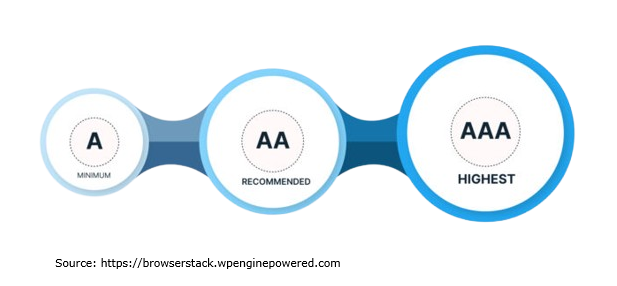
The WCAG 2.2 guidelines are organized around four key principles: perceivable, operable, understandable and robust. Each principle contains success criteria that are grouped into three levels of conformance: Level A (minimum), Level AA (recommended), and Level AAA (highest). Each level builds on the requirements of the levels below it.
Level A: Minimum or essential accessibility
WCAG Level A is the minimum conformance level and contains the most essential accessibility requirements.
Level AA: Recommended or desired accessibility
For Level AA conformance, digital content must satisfy all Level A and Level AA success criteria. This provides a broader level of accessibility than Level A and is a common target for organizations working systematically on digital accessibility.
Level AAA: Highest level of accessibility
Level AAA requires all Level A, Level AA and Level AAA success criteria to be met. W3C does not recommend requiring Level AAA as a general policy for entire websites because some types of content cannot satisfy all AAA criteria.
WCAG 2.2 conformance requirements can be found in the official documentation.
Inclusive design for digital products
WCAG provides standards for making digital products accessible, but inclusive design offers the methodology behind creating products and services that can be used by people with a wide range of abilities. In short, WCAG defines what must be achieved, while inclusive design explains why accessibility matters and how to design for it in practice.
Inclusive design is closely related to effective UI/UX design, where interfaces are developed around real user needs and different ways of interacting with digital products.
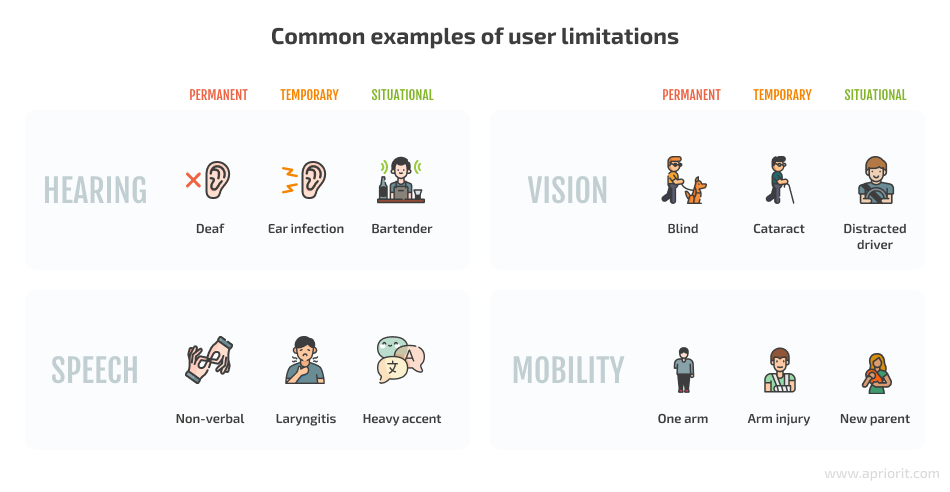
Inclusive design considers the many characteristics that influence how people interact with software. These characteristics include age, culture, geographic location, socioeconomic background, education level, language, and temporary or situational limitations. The aim is to create digital experiences that are usable, flexible and welcoming for the broadest possible audience.
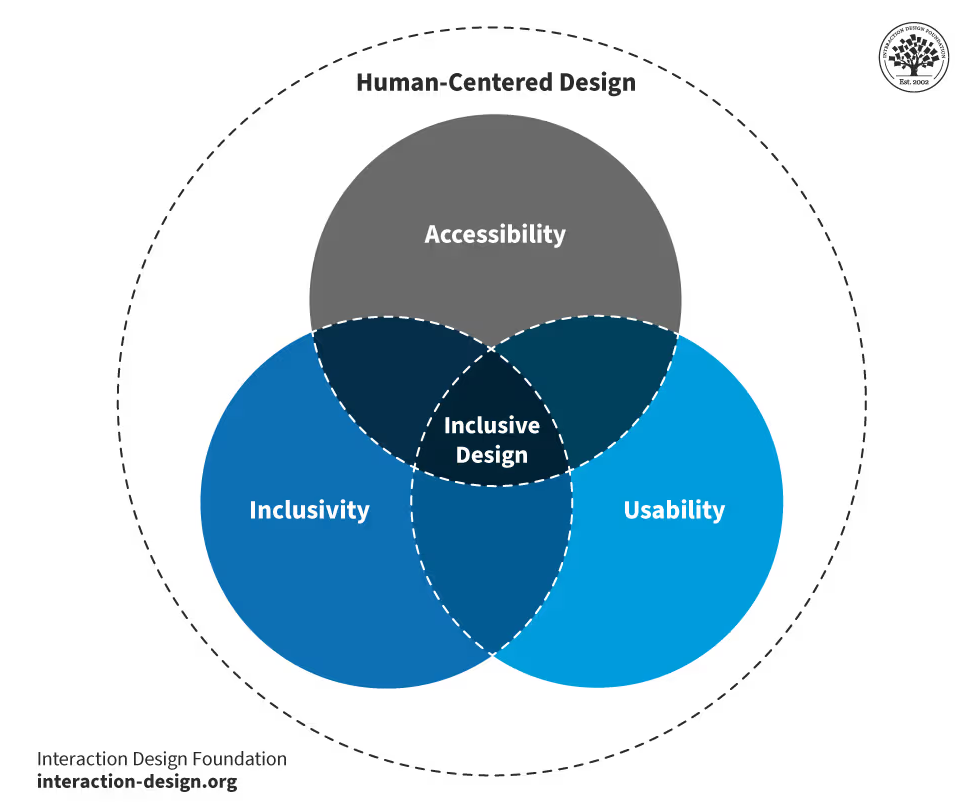
The core pillars of inclusive design are:
- Recognize exclusion: Exclusion is not limited to disability. It can occur in many situations, for example when someone uses an older device or has limited bandwidth. Identifying these barriers early through user research and testing helps teams design products that remain usable for a wide range of users.
- Learn from diversity: Inclusive design is most effective when diverse perspectives are actively integrated into the process. Involving people with different abilities, backgrounds and experiences helps identify real needs and leads to solutions that are more broadly effective.
- Solve for one, extend to many: Features designed to support a specific group, such as users with low vision, reduced mobility or speech impairments, often improve the experience for all users. This principle shows that targeted accessibility improvements can have a wider positive impact across the entire user base.
Examples of inclusive and accessible design
The examples below illustrate how inclusive design can improve access for users with different needs. Each pair contrasts non-inclusive approaches with more inclusive alternatives.
Hearing loss
- Non-inclusive options: Streaming media without subtitles, communication that relies solely on voice calls, and audio alerts without visual equivalents.
- Inclusive options: Subtitles or captions, transcripts, text-based communication channels such as chat, and visual indicators or notifications.
Vision impairment
- Non-inclusive options: Notifications presented only through pop-up messages, text-only interfaces without structural guidance, small font sizes, and low-contrast text or images.
- Inclusive options: Notifications supported by sound or vibration, support for voice assistants, scalable text, high-contrast modes and adjustable color themes.
Speech impairments
- Non-inclusive options: Voice-only authentication or interactions, and systems that require time-limited spoken responses.
- Inclusive options: Alternative authentication methods such as PIN codes or biometric options, and adjustable response times for spoken input.
Roadmap for digital accessibility and compliance
organizations that provide digital products or services can use the following steps to move toward stronger accessibility compliance.*
1. Initial assessment
A full professional audit is recommended, but organizations can begin by identifying obvious issues using quick evaluation tools such as WAVE (Web Accessibility Evaluation Tool), Lighthouse or Accessibility Insights. These tools can quickly flag common accessibility issues, but automated checks cannot assess every aspect of accessibility. Manual evaluation remains necessary for a complete assessment.
- Missing alternative text, incorrect heading structures, or insufficient color contrast
- Problems with keyboard navigation, focus management, and other basic interactions
- Common accessibility issues in key user flows
2. Determine applicable compliance standards
fter the initial assessment, the organization should determine which accessibility laws and standards apply in the markets and sectors where it operates. In the EU, this may include the EAA; in the United States, applicable requirements vary by context and may involve frameworks such as the ADA or Section 508.
3. Build a compliance roadmap
The next step is a comprehensive accessibility audit, typically performed against the full WCAG 2.2 AA criteria. The audit identifies all unmet requirements and results in a roadmap that outlines:
- Required fixes and areas of non-compliance
- Roles and responsibilities
- Estimated scope and effort
- Recommendations such as documentation updates or workflow changes
4. Documentation and maintenance
Some accessibility improvements may require significant time to implement. In these cases, organizations should publish an accessibility statement that includes:
- The current compliance level
- Known accessibility issues and expected timelines
- The date of the last review and contact information
Accessibility should also be embedded into ongoing development activities, for example by:
- Integrating automated checks into CI/CD pipelines
- Running accessibility tests before each release
- Scheduling recurring audits
- Re-testing key user journeys on a regular basis
5. Use accessible frameworks and libraries
Selecting frameworks or libraries that include accessible components can reduce the development effort required to meet accessibility standards. Examples include:
- Frontend frameworks: Angular, Vue.js, Svelte
- CSS frameworks: Bootstrap 5, Tailwind CSS
- Component libraries: Material UI (MUI), React Aria, Angular Material, PrimeNG
- Design tools: Figma, Adobe XD, Sketch
AI-assisted tools can support tasks such as generating captions, suggesting alternative text, analyzing readability and flagging potential WCAG issues. Their output should still be reviewed, as automated systems cannot determine whether a digital experience is fully accessible.
6. Include ongoing accessibility testing
To maintain accessibility over time and avoid regressions, organizations should incorporate regular accessibility testing. This includes:
- Automated testing using tools such as WAVE, Lighthouse or Accessibility Insights
- Manual functional testing, for example keyboard navigation, focus states and form behaviors
- Assistive technology testing, such as screen readers (NVDA, VoiceOver), magnifiers or voice control tools
- End-to-end testing using accessibility engines integrated into tools such as Playwright
- User testing with people with disabilities, when possible, to observe real user interaction
*Under the EAA, microenterprises providing services are exempt from the accessibility requirements. A microenterprise is generally defined as employing fewer than 10 people and having annual turnover or an annual balance sheet total not exceeding €2 million. Different obligations may apply to microenterprises dealing with products.

Conclusion
The path toward accessibility begins with awareness and continues through ongoing effort. This includes initial assessments, detailed audits, the creation of roadmaps, the selection of accessible frameworks, improvements to development workflows and regular testing with real users. Accessibility is a continuous responsibility rather than a single project milestone.
WCAG standards define what accessible content and interfaces must achieve, while inclusive design principles explain why accessibility is important and how to design with diverse user needs in mind. Together, they enable organizations to create products and services that are not only compliant but genuinely usable for a wide range of people.
Investing in accessibility can contribute to digital products that are clearer and easier to use for a broader range of users.

Essential test case creation for QA testers: availability, accessibility, and functionality in user stories

A high-level visit from the Dutch Embassy in Romania