

Automating the build process in mobile app development can improve efficiency by reducing manual work and lowering the risk of human error. Instead of manually preparing builds, signing them, and uploading them to app stores, automation tools handle these repetitive steps consistently and accurately.
This approach helps teams maintain stable release pipelines, identify issues earlier in the development cycle, and deliver updates to users more quickly. As a result, developers can focus their time and attention on writing code and implementing new functionality rather than managing routine release tasks.
Why automate mobile app builds?
In mobile app development, efficiency is essential; particularly in the build and release process.
When apps are built and deployed manually, developers spend considerable time on repetitive tasks such as version management, code signing, preparing screenshots and metadata, and submitting builds to app stores. These manual steps not only consume valuable engineering hours but also increase the risk of errors and inconsistencies.
By automating the build process, teams can achieve greater consistency, speed, and reliability. Automation reduces the operational overhead of release management and allows developers to focus on creating functionality that adds value for users.
Several tools support build automation in mobile development, each with distinct advantages:
- Fastlane: streamlines tasks such as code signing, generating screenshots, and managing store deployments.
- Bitrise: offers a cloud-based CI/CD platform designed specifically for mobile projects.
- Codemagic: provides a similar cloud-based CI/CD environment optimized for mobile workflows.
- GitHub Actions / GitLab CI / Azure DevOps: deliver flexible pipeline automation that can be adapted to mobile build and deployment processes.
This guide focuses on Fastlane, outlining how to integrate it into your CI/CD workflow and use it to simplify and optimize mobile app deployments.
What is fastlane?
Fastlane is an open-source automation tool for building and releasing iOS and Android applications. It streamlines many of the repetitive and time-consuming tasks involved in building and releasing mobile apps, allowing developers to execute complex workflows through predefined workflows called lanes. For example, a custom deployment lane could be run using a command such as \fastlane deploy_all`.`
Key features
- Code signing: simplifies the management of signing identities and provisioning profiles through secure and consistent integrations available out of the box.
- Automated screenshots: captures localized screenshots automatically for each supported language and device.
- Beta deployments: supports automated build versioning, changelog generation, code signing and distribution to testing environments such as TestFlight, Google Play testing tracks and Firebase App Distribution.
- App Store and Google Play deployment: automates the entire deployment process, including metadata upload and submission for review.
How fastlane works: Fastfile, lanes, actions and plugins
Fastlane is structured around a set of core components that define how automation workflows are created and executed.
Fastfile → the central configuration file where workflows (lanes) and their associated actions are defined.
Lane → represents a specific workflow, such as building, testing, or deploying the application.
Actions → individual tasks that make up a lane. Fastlane provides a wide range of built-in actions, including build_app, run_tests, and upload_to_app_store.
Plugins → community-developed extensions that add new actions or functionality beyond the built-in set.
Key fastlane tools and actions
- match / sync_code_signing: manages and securely shares code signing certificates and provisioning profiles across teams.
- deliver / upload_to_app_store: automates the upload of screenshots, metadata, and binaries to the Apple App Store.
- supply / upload_to_play_store: similar to Deliver, but designed for the Google Play Store. It automates the upload of applications and associated metadata.
- snapshot / capture_screenshots: automates the process of generating screenshots for different devices and configurations.
- gym / build_app: builds and packages iOS applications into IPA files.
- gradle / build_android_app: builds and packages Android applications using the project's existing Gradle build process.
Fastlane in action: automating iOS and Android builds
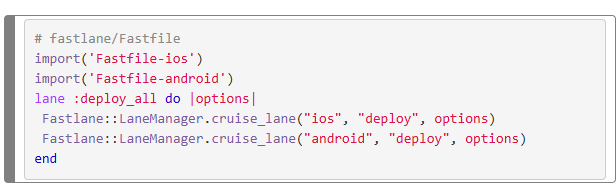
Cross-platform Fastfile (minimal setup)
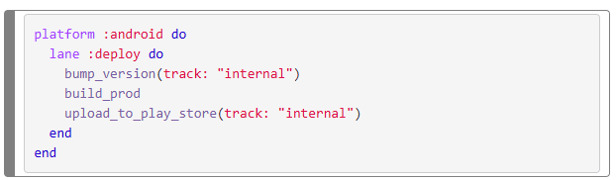
Build & deploy for Android
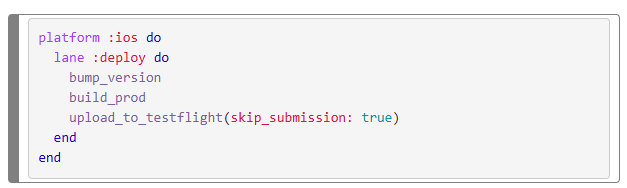
Build & deploy for iOS (TestFlight)
Benefits of fastlane for mobile app builds
Fastlane provides multiple advantages for mobile app development by automating and optimizing the build and release process. The key benefits include:
- Extensibility and Customization: offers a broad range of plugins and customization options, allowing teams to adapt Fastlane to their specific project requirements.
- Efficiency: automates repetitive tasks such as building, testing, signing, and deploying applications. This reduces manual effort, minimizes the likelihood of errors, and ensures consistent build quality through predefined configurations.
- Continuous Integration and Deployment (CI/CD): can be integrated with CI/CD platforms such as Jenkins, GitHub Actions, Bitrise and GitLab. This enables faster and more reliable release cycles while improving overall workflow efficiency.
- More consistent releases with fewer manual errors: automation standardizes recurring steps in the release process and can reduce the risk of human error, such as missing assets or incorrect configurations.
- Automated Code Signing Management: simplifies the handling of iOS provisioning profiles and certificates by automating the code signing process.
- Version Management and Changelogs: supports automated version control and changelog generation, helping teams maintain accurate release documentation.
- Open Source: fastlane is available under the MIT License and is maintained by a community of maintainers and contributors.

Integrating fastlane into a CI/CD pipeline
Fastlane integrates seamlessly with almost any CI/CD platform widely used, enabling flows such as:
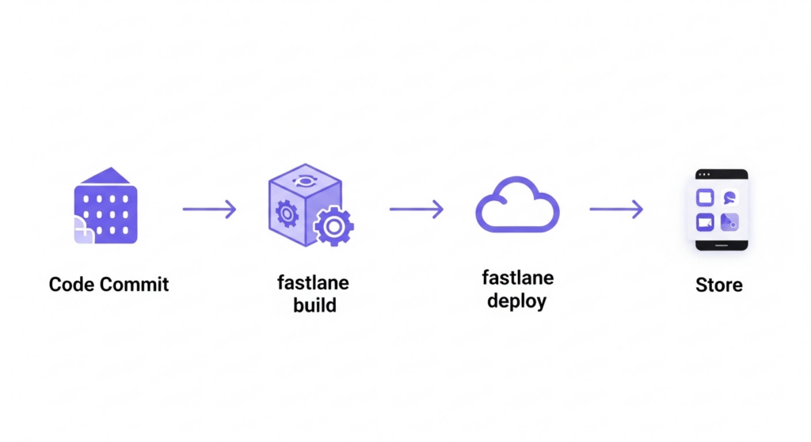
See the fastlane documentation for more information about CI/CD integrations.
Automating mobile app builds with fastlane
Fastlane is a robust automation framework that simplifies and streamlines the entire mobile app build and release process. By minimizing manual effort, improving the consistency of release processes and integrating with CI/CD systems, fastlane can help development teams deliver mobile applications more efficiently.
Whether the target platform is iOS, Android, or both, Fastlane allows developers to concentrate on writing and improving code while repetitive release tasks are handled automatically.

Buying or developing software: 10 buy vs. build criteria for making the right choice

Developing (or having developed) fleet management software: from vision to scalable platform