

As organizations increasingly adopt Kubernetes, securing communication between pods has become a fundamental requirement for maintaining a reliable and resilient infrastructure. Kubernetes provides a basic implementation of Network Policies to manage traffic between pods and services. While this is sufficient for simple use cases, production-grade environments typically require more advanced and fine-grained security controls.
This article examines how Calico builds upon Kubernetes’ native capabilities, offering extended features that support the transition from basic traffic management to a comprehensive security model.
Kubernetes NetworkPolicy: the basics
A useful way to think about Kubernetes networking is through analogy. Consider a Kubernetes cluster as a country made up of multiple cities (namespaces). Each city contains multiple buildings (pods), connected by roads that enable travel both within and between cities.
- Network Policies act as traffic regulations posted at specific buildings. They define who can enter, who can leave, and through which routes (ports).
- Ingress rules function like border checkpoints, controlling external visitors entering specific buildings (pods).
- Egress rules serve as exit controls, governing traffic leaving a building, whether directed toward other cities (namespaces) or external destinations such as the internet.
With this analogy in mind, it is useful to move to the formal concepts that will be referenced throughout this article.
Network Policy
- A Kubernetes resource that defines allow rules for selected pods, based on IP addresses, ports, and protocols.
- By default, pods are non-isolated for ingress and egress. When a NetworkPolicy isolates a pod for ingress and/or egress, only connections allowed by applicable policies are permitted in that direction.
- Network policies are additive. Each rule specifies which pods, namespaces, or IP ranges are permitted, and through which ports and protocols.
Ingress and egress in Network Policies
- Ingress rules control traffic entering pods.
- Egress rules control traffic leaving pods.
- Both are always defined from the perspective of the pods targeted by the network policy.

Kubernetes NetworkPolicy in practice
With the key concepts established, it is helpful to examine how the default Kubernetes Network Policy operates in practice, including its possibilities and limitations.
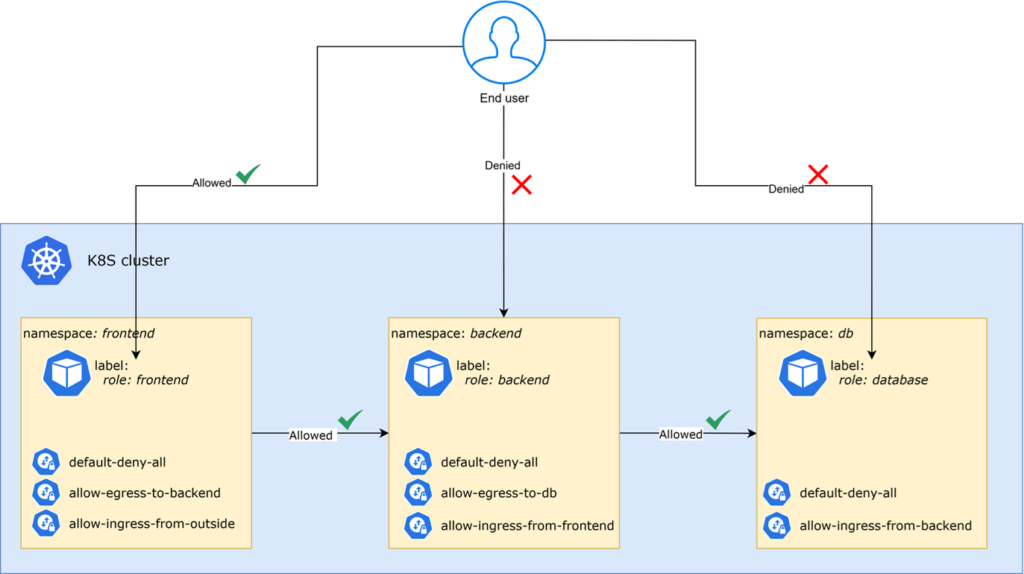
Consider a typical application architecture in which Network Policies are applied to control pod-to-pod communication across different namespaces.
In this example:
- End users can access only designated pods in the frontend namespace. This restriction is enforced by a default deny-all policy applied across all three namespaces.
- Pods in the backend namespace accept incoming connections exclusively from the frontend namespace. Outgoing connections from the backend are permitted only toward the db namespace.
- Pods in the db namespace are fully isolated, accepting incoming connections solely from pods within the backend namespace.
This setup illustrates how Network Policies can enforce controlled and predictable traffic flows, ensuring that each component of the application communicates only with the intended services.
Limitations of native Kubernetes NetworkPolicy
Even though the setup described earlier may be sufficient for basic requirements, in production environments (where services are more sensitive and security demands are higher) the limitations of the vanilla Network Policy become evident. The key ones are:
- Missing cluster-wide policy: Network policies are namespace-scoped. As in the previous example, the default deny-all policy had to be deployed in each namespace. This increases complexity when aiming for a standardized, cluster-wide approach.
- Pod-centric, namespaced: Policies target pods, not Services. It is not possible to define a rule such as “allow to Service X.” In the earlier example, all policies were applied to pods selected by labels.
- No FQDN-based policy targeting: Native Kubernetes NetworkPolicy cannot select external destinations by domain name. Policies instead rely on selectors, IP addresses, and CIDR ranges.
- No explicit deny rules or priority: All policies are additive allow lists. There is no mechanism to apply deny rules or set priorities that override existing allows.
- No built-in traffic encryption or detailed observability: Kubernetes NetworkPolicy controls which connections are allowed, but does not itself encrypt workload traffic or provide detailed flow-level visibility.
- Limited decision logging: Network Policies lack logging support for applied rules or decisions, making it difficult to diagnose or resolve communication issues.
Depending on application requirements, these limitations may prove to be a critical barrier. One possible solution is the Calico project, developed by Tigera.
What is Calico and what does it
According to Tigera, Calico is a single platform for Kubernetes networking, network security, and observability, supporting any Kubernetes distribution in the cloud, on-premises, or at the edge.
Whether an organization is just starting with Kubernetes or managing a mature, multi-node cluster, Calico can address most network requirements an application or infrastructure may demand.
As the saying goes, “a picture is worth a thousand words.” In this context, a landscape overview of Calico provides the most useful perspective.
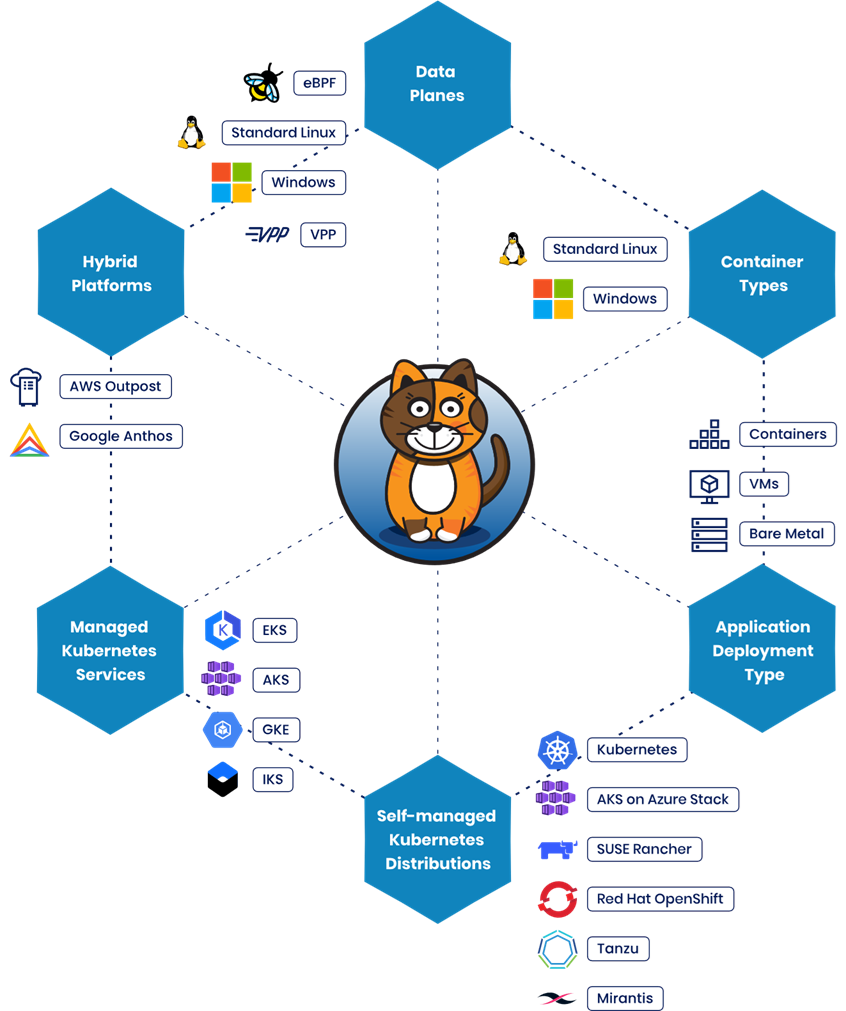
As shown in the landscape above, Calico has several notable characteristics. Feature availability varies by Calico edition and configuration:
- Cross-platform availability: Calico supports both Windows and Linux containers.
- Flexible deployment options: Whether the application runs in a virtual machine, on bare metal, or in a container, Calico operates consistently across environments.
- Plug-and-play integration: Application components do not require modification. Network security can be fully managed by the platform or security team.
- High-performance data planes: Calico supports multiple Linux data planes, including eBPF, nftables, and iptables, allowing teams to choose based on their platform and networking requirements.
- Multiple delivery models: Calico can be used in different ways: as part of a self-managed Kubernetes distribution or as a SaaS option available in Azure, AWS, or Google Cloud.
How Calico extends Kubernetes NetworkPolicy
Having outlined Calico’s purpose, we can now return to the earlier example and examine the limitations identified with the default Kubernetes Network Policy.
Calico extends the standard Kubernetes Network Policy with additional capabilities that provide greater control over cluster traffic. Below, each of the previously noted limitations is revisited, along with the way Calico addresses them:
Global Network Policy
Unlike Kubernetes Network Policy, which is limited to a single namespace, Calico’s Global Network Policy can apply rules across all namespaces or target specific ones. This enables consistent, cluster-wide security enforcement.
For example, a single default deny-all policy can be written to cover the entire cluster. This aligns with the Zero Trust Network model, in which all traffic is initially denied and access is explicitly granted only as required. Read the official Calico documentation on GlobalNetworkPolicy
Targeting Kubernetes Services with Calico
Unlike native Kubernetes NetworkPolicy, Calico can match a specific Kubernetes Service in policy rules. Service matching is supported when using the Kubernetes datastore driver and is not supported when using the etcd datastore driver. This makes it possible, for example, to define access from the frontend namespace to a specific backend service. Read more in the official Calico documentation on service matching.
DNS/FQDN-based egress rules
Calico Cloud supports FQDN-based egress allow rules, allowing policies to permit traffic to external domains such as api.example.com without hard-coding IP addresses. This functionality applies to outbound traffic. Read more in the official Calico Cloud documentation on DNS policy.
Policy tiers
Calico introduces policy tiers, such as security, platform, and application. These tiers establish order and priority in rule enforcement. For example, a security team can manage policies in a top-level tier that always applies before application-specific rules.
By comparison, vanilla Network Policies only allow additive rules, all applied at the same level.
Advanced security features
Calico adds several advanced capabilities:
- Explicit deny rules, enabling more precise control over blocked traffic.
- Encryption of supported inter-node traffic through WireGuard, allowing traffic between participating Kubernetes nodes to be encrypted in transit.
Read more about WireGuard encryption in the official Calico documentation.
Observability
With vanilla network policies, visibility into cluster communication is limited, making troubleshooting difficult.
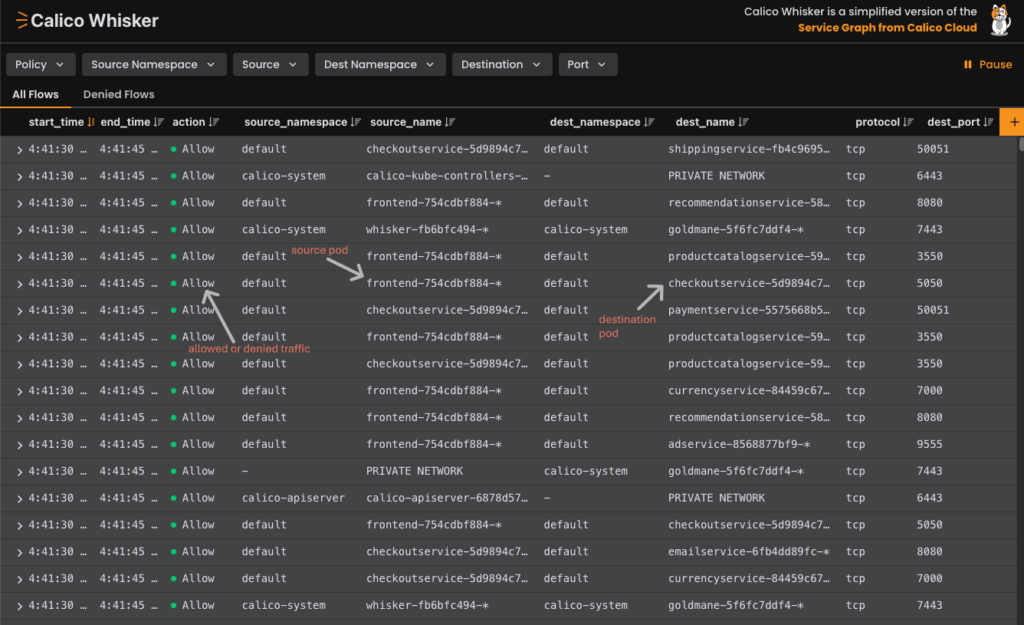
Calico Open Source provides flow-level observability through flow logs and the Calico Whisker web console, which displays network flow activity in real time. Calico Cloud and Enterprise provide additional observability, policy-management, and security capabilities.
| Feature | Vanilla Network Policy | Calico Network Policy |
|---|---|---|
| Scope | Policies limited to a single namespace | Supports both namespace-scoped (Network Policy) and cluster-wide (Global Network Policy) |
| Default-Deny Behavior | Must be explicitly defined | Easily configured as a baseline for both ingress and egress traffic |
| Deny Rules | Only allow rules are supported | Full support for deny rules on both ingress and egress |
| DNS / FQDN Rules | Not supported | Availability depends on the Calico edition and configuration |
| Policy Ordering | No tiers; all policies applied equally | Tiered policy ordering (e.g., infrastructure vs. application-level rules) |
| Advanced Matching | Limited to basic pod and namespace selectors | Supports IP blocks, named ports, service accounts, and other advanced match criteria |
| Custom Resources (CRDs) | Only the built-in Network Policy is available | Additional CRDs such as Global Network Policy, NetworkSet, and HostEndpoint |
Key integrations: eBPF, WireGuard, and Envoy
Calico integrates with several technologies to strengthen security, improve performance, and increase visibility within Kubernetes clusters:
- eBPF moves networking and security logic directly into the Linux kernel, enabling higher performance and detailed packet flow visibility.
- WireGuard provides lightweight encryption for supported inter-node traffic. It should not be interpreted as end-to-end encryption for all pod-to-pod communication.
- Envoy works alongside Calico to apply and enforce service-to-service security policies, securing applications at both the network and application layers.
Together, these integrations demonstrate how Calico extends beyond basic network policies, evolving into a comprehensive networking and security platform for Kubernetes. They enhance performance, provide encryption, and increase transparency into network traffic.
However, these are not the only features Calico offers, nor is there a single edition available. The next section explores the different production editions of Calico and their intended use cases.
Calico Open Source vs. Cloud
Calico is available in several editions, including Calico Open Source, Calico Cloud Free Tier, Calico Cloud, and Calico Enterprise. In this comparison, we focus on two commonly considered options: Calico Open Source and Calico Cloud.
Calico Open Source: self-managed control
For organizations that prefer to manage their own infrastructure, the open-source edition of Calico provides a strong foundation for Kubernetes networking and security. Key characteristics include:
- Full support for Kubernetes Network Policies
- Flexibility to adapt and extend according to cluster needs
- An active community for support and collaboration
- No license fee, while infrastructure and operational costs remain.
The trade-off is greater internal operational responsibility, including upgrades, monitoring, troubleshooting, and maintaining platform stability.
Example: Calico Whisker
The open-source edition also includes observability capabilities. For instance, Calico Whisker provides a lightweight dashboard offering real-time visibility into network flows.
Calico Cloud: managed security and observability
Calico Cloud builds on the open-source foundation and provides a managed service available across major cloud platforms such as Azure, AWS, and Google Cloud.
In addition to the capabilities of the open-source edition, Calico Cloud offers:
- A single pane of control for managing multiple clusters from one interface
- Real-time traffic flow visualization
- Built-in compliance and audit capabilities that can support regulatory and governance requirements
- Advanced security features such as intrusion detection, zero-trust enforcement, and more
Calico Cloud is subscription-based and provides managed capabilities that can reduce operational overhead while adding security, observability, and policy-management features.
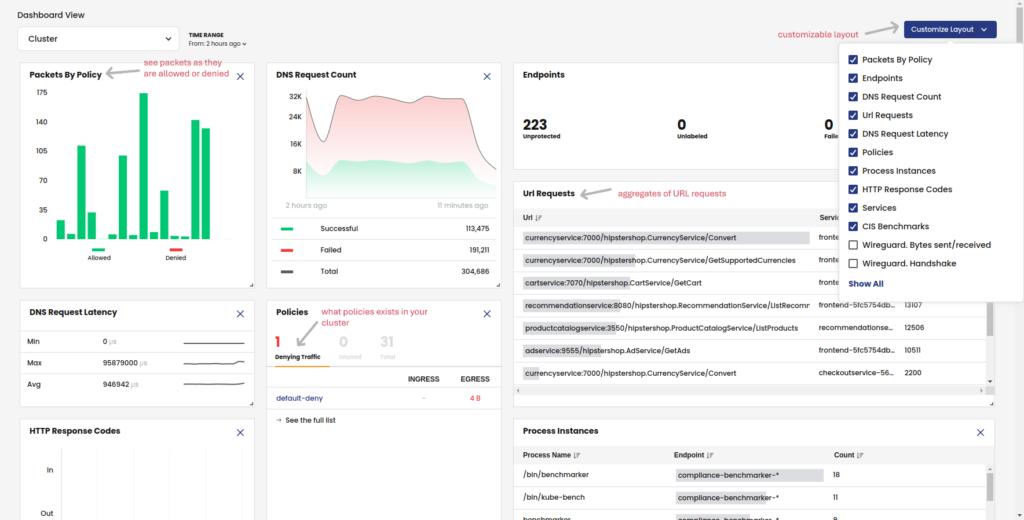
Example: Calico Cloud Dashboard
The example below illustrates the advanced observability features available in Calico Cloud.
Finally, the two editions can also be compared from a more strategic perspective, focusing on broader operational criteria:
| Aspect | Calico Open Source | Calico Cloud |
|---|---|---|
| Operational setup & management |
More internal configuration and operational management | More managed functionality and centralized management |
| Maintenance | Higher (your team manages updates, scaling, and monitoring) | Lower (Tigera manages upgrades, scaling, and integrations) |
| Cost | No license fee; infrastructure and operational costs remain | Subscription-based (additional cost, but predictable budgeting) |
| Flexibility | Maximum (full control, open ecosystem) | Balanced (reduced DIY effort, more out-of-the-box features) |
| Visibility | Flow logs and Whisker available; management remains self-managed | Built-in traffic flow visualization and audit capabilities |
| Security | Advanced network policies and configurable security capabilities | dditional managed security, observability, and compliance capabilities |
For a complete list of available features, check the official feature comparison matrix.
Conclusion
Vanilla Network Policies represent a useful starting point. However, real-world Kubernetes environments typically require stronger measures to meet production security needs. Calico extends the native capabilities, delivering a more comprehensive security framework that is suited for production use.
By integrating with technologies such as eBPF, WireGuard, and Envoy, Calico further enhances performance, provides encryption, and strengthens service-level security.
Working with Kubernetes and looking to strengthen networking, observability, or cloud security? Explore our Enablement Services to see how NetRom supports cloud-native infrastructure and security.

Flexible scaling with nearshore outsourcing: less risk, more continuity
WebRTC versus MQTT: differences, applications and use cases